

As you know, Apple hosted the WWDC 2026 event. This year, unlike previous years, instead of emphasizing what innovations came to the operating systems one by one, they focused on innovations affecting every platform. In this context, we can say that an important part of the Keynote presentation was dedicated to the subject of children’s safety and to Apple Intelligence and Siri innovations. If you want to watch the entire Keynote, you can use the link below.

If we need to summarize in a single word the innovations coming on the device management side — the main line of business we address on Settings Blog — I think we can use the keyword “DDM”. Since the day Apple first announced the Declarative Device Management concept in 2021, it had been telling us the same thing: “The future of device management is declarative management.” That is, the future of device management was declarative management. This year it replaced this sentence with the following: “The standard for device management is declarative management.” That is, the standard of device management is declarative management. If you still manage your devices with only MDM policies, you should get used to something being missing in your life. The innovations coming with macOS 27 also support this statement. Through the eyes of Apple system administrators, let’s look at the main innovations together.

First, Apple Business
Before WWDC, in April, Apple restructured Apple Business Manager. It combined some operations that organizations did in different separate Apple portals. And it added a free MDM inside it too. This year’s WWDC innovations also started by primarily emphasizing this. There are now new APIs in Apple Business. The existing APIs that list servers, devices, and inventory, manage inventory assignment, and bring AppleCare warranty information had been introduced at last year’s WWDC event. In addition to these, you can create Blueprints and Configurations, edit users and groups, and pull application license information and audit event records. So in summary, APIs related to the built-in device management service have also been added this year.
Centralized Subscription Purchasing
A new bulk licensing mechanism is coming for subscriptions in App Store applications. That is, you’ll be able to purchase application subscriptions with the same VPP workflow you use when distributing applications in bulk and assign them to groups or organizations. On this occasion, your organization will be able to distribute, for example, a Claude subscription to its employees. This feature will come to the Apple Business and Apple School Manager side in the future. Let’s hope in-app purchases are next too.
If you want to watch, there’s an independent session dedicated to this subject. You can watch it here.

DDM
Declarative Device Management is now our main character. The vast majority of this year’s innovations are built on the declarative management model. So I’ll keep this section a bit long. Don’t run out of your tea or coffee. In the management we did via the old XML-based configuration profiles, we experienced a kind of problem in the distribution of items like certificates. After binding a certificate to, for example, 4 separate configuration profiles, updating the original certificate didn’t mean updating all the other configurations in one go.
Since the Declarative Device Management model supports the many-to-many relationship, more than one configuration can reference a single credential. For this reason, configuration profiles that use credentials are now being moved to declarative configurations. When you need to renew a credential (for example, a certificate), the only thing your server needs to do is change the relevant asset. The device itself updates all the configurations that use that certificate. Whether certificate, identity, or password, wherever a credential is needed, a declarative asset now comes into play.
Status Channel
One of the strongest aspects of DDM in my opinion is the Status Channel. Because with the MDM protocol Apple developed in 2011 and that has come to today, there was a gap between a device receiving and applying a sent policy and reporting the information that it applied it back to the server as an inventory update.
The Status Channel allows the server to learn of status changes without needing to continuously query the device. With macOS 27, a lot of new status items came here: enrollment type, awaiting device configuration, return to service status, Shared iPad information, the device’s current push token, and more. Also, a new status item that reports whether the user turned on Lockdown Mode was added. And the part that could directly concern help desk teams is device system health monitoring. iOS and iPadOS devices already reported problems related to hardware components to the user via the Settings application. Now iOS and iPadOS 27 present the same information to us too with a new declarative status item. You can see the health status of hardware components like baseband, camera, Face ID, and Touch ID across your whole fleet. An important innovation for help desk staff who want to intervene before a problem grows.
Related to this subject, you can take a look at my article named iPhone Diagnostics Mode about the use of problem diagnosis mode on iPhones.
Content Caching Is Now in DDM Too
Content Caching is a service that reduces bandwidth usage and increases download speed by hosting software updates, applications, and other content on Macs in the local network. If you want to get detailed information about Content Caching, you can take a look at the What Is Content Caching? article I wrote earlier on this subject. With macOS 27, a declarative configuration to control this service and new declarative status items that report the service’s status came. So you can directly monitor the health of your content caching server fleet. Moreover, content cache servers can now send their own reports to an HTTPS endpoint you want; this opens the way to setting up more advanced monitoring dashboards. Moving from here, you can head straight over to Claude Code, that is…
Managed migration
ou must have heard of Migration Assistant. Even if you haven’t tried it on a Mac, I think you’ve at least seen your information being automatically transferred during the transition from one iPhone to another iPhone.
There’s one more feature that will ease your work when you want to migrate your users from an old Mac to a new MacBook Neo: managed migration. Managed Migration is actually not a macOS 27 innovation. It entered our lives with the macOS 26.4 update. Right after enrolling in device management, a new declarative configuration is distributed to the device, and thanks to this, both the data is migrated and the MDM enrollment and settings are preserved. The system administrator determines which accounts, files, and security/privacy settings will be migrated. These settings are shown to the user but come locked; the only thing the user needs to do is press Continue and start the process.

Application Management
Declarative app configuration has finally come to macOS. The declarative app configuration feature we’ve been using on the iOS and iPadOS side for a while is coming to macOS 27. This will have short- and long-term effects. We could already prepare application configurations via .plist files and send them with XML-based configuration profiles. But we were distributing these configurations with the old MDM protocol. And this could lead to some troubles regarding synchronization. For example, an application itself could have been installed before the profile file carrying its settings… Application configurations moving to the DDM infrastructure eliminates these problems. That’s its short-term effect.
Looking a bit more generally, we’ll be able to add other DDM assets to application configurations, and scenarios like using managed applications with a hardware-bound key, for example, are possible. In fact, usages like enabling Managed Device Attestation support instead of relying on certificates for authentication with corporate services may also be in question.
Package Deletion

A small but, in my opinion, important innovation: with macOS 27, you can collectively delete all the files and folders that a declarative management package installed when the configuration is removed. Now, when there’s no longer a need, unwanted data and files don’t remain behind on the device.
As you know, there are various methods of installing applications on the macOS operating system. One of these is drag-and-drop style applications. No special installer is needed for the installation of these applications. And generally all the content necessary for these applications to work is also located inside their own application file (.app). But besides these, some applications come with the .PKG extension and can be installed with the Installer application. Applications of this kind can write files to various points in our system too. With this new feature, other data belonging to the application installed with .PKG can be automatically deleted after the application is deleted from the user.
Single PPPC Approval
The PPPC concept is generally simple. But I know from my own experiences that someone hearing the PPPC concept for the first time listens to you as if you’re talking about rocket engineering. If you don’t know how the PPPC structure works, I can recommend you read my article What’s This Thing Called PPPC?.
We already send the PPPC settings related to the applications you distribute with the MDM / UEM solutions we use to user computers. But there are some permissions we can’t give. Like camera, microphone, location permission, keyboard input activities, and screen recording, which must be entirely subject to user permission. In macOS 26 and earlier, an application needing one of these — permissions we can’t give — could ask the user this every time. In macOS 27, the process of getting approval from the user has been combined into a single screen.

This combined approval screen is valid not only for applications but also for websites you access with Safari that require special permission. With iOS, iPadOS, and macOS 27, a single approval screen is shown when the application first opens or a site first appears in Safari. On this screen, the name of the organization and the application, a justification entered by the system administrator, and which privacy component access is wanted and why are clearly written. If the user says Allow, the defined defaults are applied and no additional notification comes up while using the application.
Binary Execution Control on Mac
We were already taking various measures like restricting the Mac App Store and Gatekeeper settings so that users couldn’t install applications on their own. Or we could determine which applications could be run by creating a Blacklist/Whitelist for applications. But these controls audit whether files properly packaged as applications can be installed and run. Besides these, script files coming from various sources or various applications that can be run via Terminal can also be on our Macs. For example, the user may have installed brew before the computer started being managed with MDM. Standard Gatekeeper and Blacklist/Whitelist settings fall short of detecting these kinds of usages.
With macOS 27, new declarative management settings are coming to control binary execution. This is a Blacklist/Whitelist mechanism embedded in the operating system that allows a program to run or blocks it according to the rules the system administrator defines via MDM, and, when necessary, also kills running processes. Until now, system administrators benefited from various EDR software or, for example, Google‘s Santa to be able to automatically detect these kinds of usages and ensure the organization’s security posture. Now we’ll be able to do this without installing an additional 3rd-party tool, directly via our MDM solutions that use macOS‘s Endpoint Security framework.
Platform SSO Innovations
Without a doubt, Platform SSO is Apple’s new favorite. As organizations orient toward using many technologies over the cloud, Platform SSO started being used more frequently instead of Kerberos SSO or old-style AD Bind. In this context, we’ve now gotten used to seeing various innovations related to Platform SSO at every WWDC.

One of the innovations coming this year is that Touch ID can now be made mandatory. Until now, Touch ID was optional. With macOS 27, system administrators can make it mandatory for users to use Touch ID in addition to a password on their corporately managed devices. Alongside the standard password, Touch ID can be used for all of the operations of logging into the computer, unlocking the screen lock, and unlocking the FileVault lock.
A new web-based authentication option is coming for Platform SSO. IdPs can use a web view on the login window and screen lock screens. Within this HTML area, you can run almost all of your authentication scenarios: one-time codes for multi-factor authentication (that is, TAP), push notifications or QR codes for conditional access scenarios… If you’ve previously used one of the tools like Nomad, Jamf Connect, Kandji Passport, or Mosyle Auth, you must be used to seeing the IdP‘s login experience on the login screen instead of macOS‘s login user interface. A similar structure is also coming to Platform SSO configurations with macOS 27 Golden Gate.
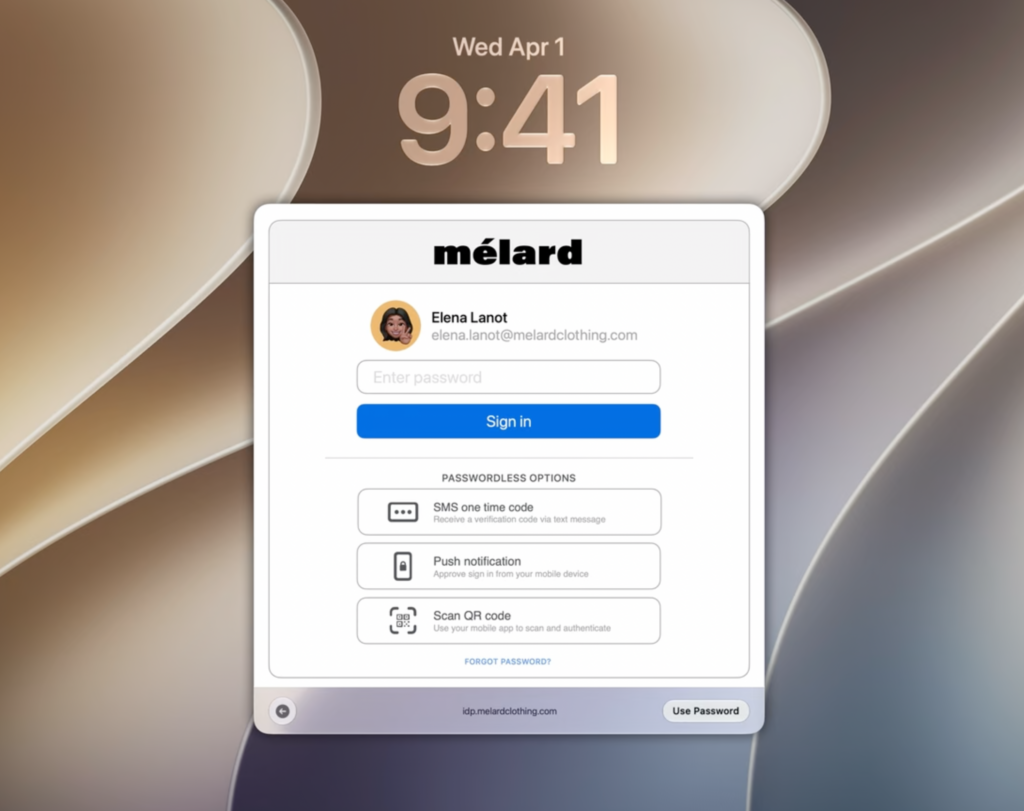
The web-based authentication options work in all of the login window, screen lock, and FileVault unlock processes, just as with Touch ID. Offline authentication is also supported, so access is provided without a security vulnerability on devices not connected to the internet too. I’m sure that in many firms using Platform SSO, the Web View option will be preferred instead of the standard macOS login experience.
At last year’s WWDC, macOS‘s old Guest User usage had turned into Authenticated Guest Mode by getting Platform SSO support. On computers where FileVault is on, the working of Guest Mode was until now limited to Safari opened in a separate session. In macOS 27, Authenticated Guest Mode can now log in by also unlocking FileVault. And this is an important innovation for environments where shared devices are used, like schools, hospitals, or production facilities.
You can watch Apple’s What’s new in managing Apple devices presentation here.

Leave a Reply