

Do you use Platform SSO in your organization? After the macOS Golden Gate transition, did you experience any Authentication problem related to Platform SSO? In recent weeks, I’ve received feedback like this from more than one company using Platform SSO: “The Platform SSO workflow that worked without problems started showing login problems after the Golden Gate transition.” Users get the “Authentication failed. Try again or contact your administrator” warning and can’t log in to their computers and/or can’t complete the Platform SSO registration process.
As of mid-October 2026, when this article is being written, it hasn’t been recorded as a ‘known issue’ by Microsoft and Apple. We only see the following statement, which may be related to the subject, in the release notes of the beta versions of macOS 26.2:
The new Platform SSO login experience at FileVault unlock, at the Lock Screen, and at the login window is now only used automatically when AuthenticationMethod is set to OpenID, or when LoginPolicy, UnlockPolicy, or FileVaultPolicy are set to RequireTouchID or RequireTouchIDOrWatch. You can also set AlwaysUseLoginUI to true to enable the same experience for other supported authentication methods.
Let me explain what’s said without translating it one to one: the web-based login experience announced at WWDC will, as of 27.2, be valid only in the following cases:
- In case OpenID is selected as the Authentication Method
- In case verification with Touch ID or Apple Watch is used for LoginPolicy, UnlockPolicy, and FileVaultPolicy
What we understand from this explanation is that before 27.2, the new login experience was used for all Authentication methods, including Password. And this may have caused it not to be able to fall back to the classic login screen as a fallback.
So far, among the vendors, only Okta has documented this subject. Okta addresses this problem in their article titled Platform SSO Authentication Failures Occur After Upgrading to macOS 27. They write that the underlying cause of the problem is that the Platform SSO device encryption keys are inaccessible for some users.

Solution Suggestions
Okta‘s first suggestion for a solution was “don’t move to macOS 27.” 🙂
In addition to this, they suggested first a restart so that the device can regenerate the necessary encryption keys, and afterwards entering the device password to be able to unlock the Keychain. They also added, restart again if necessary. It’s really very nice that Okta suggests some steps for a solution with good intentions, but the problem here is already that the device password isn’t being accepted.
A Quick Workaround
To quickly get rid of this problem, you should start your Mac from macOS Recovery, reset the local user password, and restart. After you do this, the Platform SSO Registration process will come up in front of you again. By following the steps in the Platform SSO Registration pop-up that opens, you can re-match the local account password you reset with the IdP.
I won’t go into the details since I’ve addressed them in different articles before. But for resetting the password via macOS Recovery, you’ll need the FileVault recovery key if it’s enabled, and the Recovery Lock password, again if it’s enabled. You can get both of these pieces of information via the MDM you use.
One More Alternative
If the FileVault Policy, Login Policy, and Unlock Policy options weren’t previously active in your Platform SSO configuration, you can also activate them with the AttemptAuthentication key. This way, it will first try login with the IdP (Entra or Okta) account password, and afterwards will start trying the local user password as fallback. Of course, this too isn’t a definitive solution to the problem. There are users in the MacAdmins Slack group who report experiencing the problem even when these options are active.
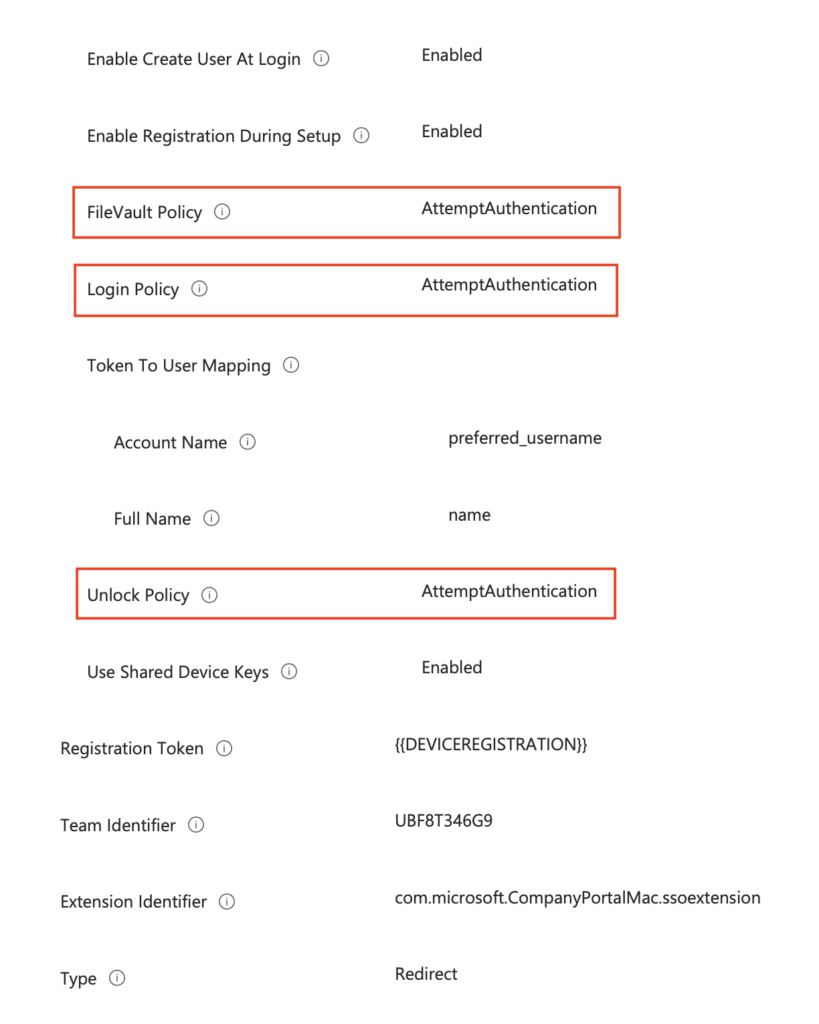
From this point on, we’re waiting for Apple to release the final version of macOS 27.2, whose 4th beta version it released today, and for this version to be a cure for this trouble.
Leave a Reply