

In this era when Apple is being talked about and starting to be used more and more in the corporate world, perhaps the first step for IT teams that want to join the Apple ecosystem or already use it is to make Apple devices manageable at the corporate level.
Apple offers organizations a wide field of action to be able to manage devices, and both Apple and 3rd-party developers are expanding this scope every day by offering more content.
But before anything, it’s worth mentioning a small difference in approach. Rather than an approach that gives control of the device entirely to IT as in Windows, Apple has a structure that supervises the device by making it compatible with corporate infrastructures. At its foundation is the idea of not just restricting the device, but freeing it securely.
The first and perhaps biggest step to experiencing and understanding Apple’s corporate management is a correctly designed PoC (Proof of Concept) process. Thanks to the PoC process, while the topics of Apple devices’ compatibility with your infrastructure and how they can be made compatible are addressed, it allows us to say to IT admins who have a cold view of Apple, “Actually, it’s not such a distant technology.”
But here too, the key phrase is “Correct PoC.”

So what is this “Correct PoC”?
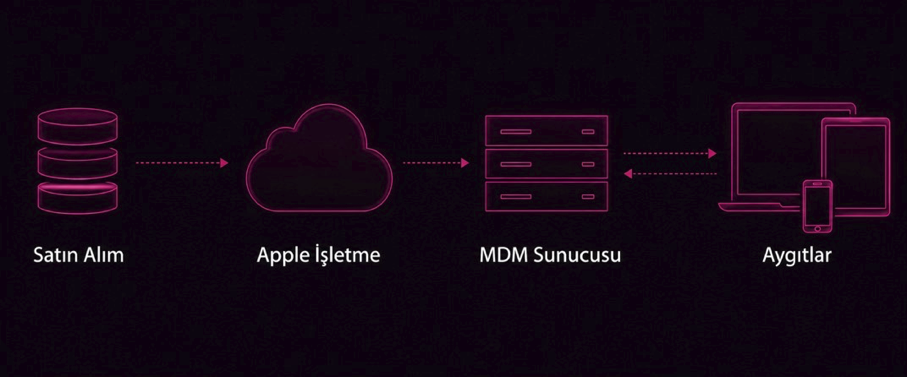
Actually, it is fulfilling the prerequisites of the PoC, determining the correct requirements, and providing the operation in accordance with the method Apple requests (Apple Business + MDM).
For example: You moved with a Windows reflex and AD-bound the Macs (in other words, joined them to the domain), but you encountered problems as early as the “user login” stage. Apple comes across as if it’s not ready for the corporate world.
Or you left the FileVault feature that comes built-in on Apple devices outside the scope of the PoC. This time you’ll have not provided an operation related to disk encryption. (FileVault = BitLocker in Windows)
Our first key phrase here is “Correct PoC.”
In this context, we Mac admins pose some questions to organizations to determine the correct roadmap before the PoC. These questions are a lengthy list such as:
- Is there an Apple Business account?
- Is there a currently used/licensed MDM solution?
- The organization’s application inventory?
- What is being used as the identity provider (Entra ID, Google Workspace, etc.)?
- Identity infrastructure cloud – hybrid – on-prem?
- The organization’s network infrastructure and 802.1X rules?
Depending on these, the configurations that need to be defined are determined and completed by being implemented on the day of the PoC.
For example: While a configuration profile named Platform SSO needs to be defined for the identity integration of an organization using a cloud identity infrastructure via Entra ID, a configuration profile named Kerberos SSO should be defined for an organization using a hybrid or on-prem identity infrastructure.tform SSO isimli bir yapılandırma profili tanımlanması gerekirken hibrit ya da on-prem kimlik altyapısı kullanan bir kuruma Kerberos SSO isimli yapılandırma profili tanımlanmalıdır.
PoC Prerequisites
We had previously conveyed that it’s necessary to go the way Apple shows for a healthy PoC to take place. At the head of this subject, as we’ve stated in many pieces of content before, comes the joint use of Apple Business and an MDM solution.
Apple Business is a free Apple service that allows the organization to organize the Apple devices, applications, and corporate Apple services it owns under a central structure.
It falls to MDM to provide topics such as distributing configurations, security policies, and applications suitable for organizational needs to devices, remote intervention, and supervision of devices.
We fundamentally have 4 prerequisites:
- Apple Business
- MDM
- 1 Apple device
- Preferably coffee
After these requirements are met, the PoC is provided for the following basic headings:
- Apple Business and MDM Definitions
- Identity and Access Management
- Network and Connectivity Management
- Security and Compliance Management
- Operating System and Update Management
- User Experience and Interface Management
- Application and Software Management
- Device Lifecycle Management
The sub-items and explanations of these headings are as in the table:
Before the PoC | |
MEU (Mac Evaluation Utility) | Apple states that the corporate network needs to access some Apple services for device management. It is used to control the corporate network’s access to these services. |
Apple Business Management | |
Apple Push Notification Service (APNs) Definition | All communication related to Apple devices is provided via the APNs server. |
Apple Business & MDM Definition | The integration of the two services with each other is provided so that the devices registered in Apple Business can be assigned to MDM servers. |
Acquisition of Applications and Services – VPP Definition | Applications acquired via Apple Business are stored in an application token named VPP. For these applications to be displayed on the MDM, a VPP definition is provided within the MDM. |
Managed Apple Accounts Configuration | It is one of the important topics for personnel to use corporate devices with corporate Apple accounts. In this context, the organization domain is defined in Apple Business and Managed Apple Accounts are created. |
Apple Services Access Configuration | Configurations regarding access to Apple services are provided. It prevents an individual identity on a corporate device or the use of a corporate identity on an individual device. |
Identity and Access Management | |
Platform SSO/Kerberos SSO Configuration | 360-degree identity management is provided with personnel’s Apple identity, local user identity, and corporate identity having the same username – password. |
Local Administrator Configuration | Configurations such as the personnel being a standard privileged user on the device but creating a hidden admin account entirely under IT control to be able to intervene when needed are provided. |
Network and Connectivity Management | |
802.1X Wi-Fi Configuration | By providing a network definition suitable for the organization’s 802.1X structure, the device is connected to the requested corporate network. |
VPN Configuration | Application distribution or configuration suitable for the VPN structure used by the organization is provided. |
Security and Compliance Management | |
FileVault Configuration | It makes disk encryption mandatory on the device, and password management is entirely with IT. |
Gatekeeper Configuration | It manages the personnel’s permissions to be able to download applications. If you wish, it allows only applications to be installed from the App Store, or if you wish, downloading only from applications within a whitelist to be created by the organization. |
Compliance Policy Configuration | It allows the organization’s compliance policies to be determined (e.g. min OS version, etc.) and an action plan to be prepared for devices that fall out of compliance. |
Activation Lock Configuration | It is ensured that control is with IT in the encryption that takes place via the Apple identity defined on the device. |
Recovery Mode Restriction | It prevents the personnel from putting the device into Recovery Mode (you can think of it like the BIOS in Windows). |
Background Security Improvements Configuration | While personnel work on their Mac, the security patches Apple releases are installed on the device with a silent installation structure. |
Erase Mac Restriction | It prevents the personnel from using the device-reset area located within the device settings. |
External Storage (USB) Restriction | It does not allow any external disk to be plugged into the device. |
Operating System and Update Management | |
Update Management Configuration | It allows the management of all OS updates such as deferring the update, setting an update date, or forcing the update. |
Minimum OS Version Policy | By specifying a minimum or maximum OS version within the compliance policy, all devices are equalized at the same OS version. |
User Experience and Interface Management | |
Lockscreen Text Configuration | Phrases such as “This device belongs to the …. organization,” etc. are placed on personnel devices. |
Setup Assistant Configuration | It is determined which areas personnel will encounter while still on the device setup screen. |
Application and Software Management | |
Application Distribution | Corporate applications are distributed to devices. |
Application Distribution Options | It is the determination by the organization of which device-user group the applications will be distributed to with mandatory-optional options. |
PPPC (Privacy Preferences Policy Control) | Application permissions are distributed to devices. It is determined which applications will be run via which permissions or restrictions. |
Device Lifecycle Management | |
Remote Locking | Locking the device remotely in possible scenarios. |
Remote Wipe/Reset | Resetting the device remotely in possible scenarios. |
Activation Lock | It is ensured that control is with IT in the encryption that takes place via the Apple identity defined on the device. |
Retiring the Device | The device being retired and its relationship with the organization being severed. |
All these operations introduce you to basic Apple device management. On top of this basic structure, different configurations, restrictions, etc. can be added in line with the organization’s needs. To understand and go deeper into the Apple ecosystem, don’t forget the power of the PoC, and for more content regarding the Apple world, don’t forget to follow the blog.
Photo by Jakub Żerdzicki on Unsplash
Leave a Reply