
You wanted to try an app. And by logging into the Apps section in Apple Business Manager, you purchased it in the quantity you wanted. But then you noticed that this app is not suitable for your organizational needs. You want to delete it from Apple Business Manager. How do you delete it?
I’ll answer: you can’t delete it. For now, there is no feature such as being able to remove apps purchased in Apple Business Manager. Don’t immediately say to me “Are you doing clickbait?” I’ll describe a method that will ease your workflows.
The apps you purchase automatically appear inside your MDM server via the VPP Token you downloaded from ABM. The dozens of apps you purchased to try will also appear in your MDM server this way.
You can’t delete apps from ABM. But you can prevent the apps you got for trial purposes from crowding your MDM server. For this, you can follow the steps below.
1. Log into Apple Business Manager
2. Come to the Locations part
3. Create a new Location. Give it a name like “To Be Deleted.” You can enter any address while creating the Location.

4. Click the Apps section from the left column. You’ll see your apps in all Locations together.
5. If you don’t know which app is assigned to which Location, you can view the apps assigned to a specific Location by using the filtering feature at the top of the app list.
6. Click the name of one of the apps you don’t want to appear in your MDM server. This action will open the detail page of the app.
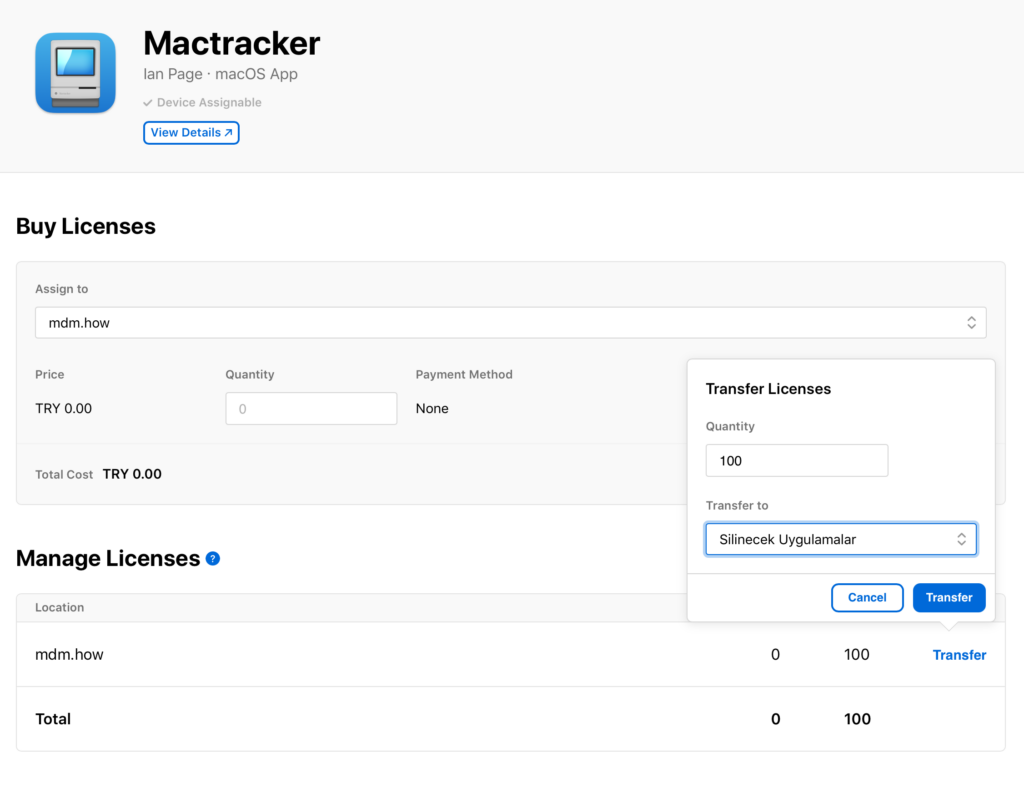
7. On the screen that opens, at the bottom under the Manage Licenses section, you can see how many licenses of the app you have under which Location.
8. By clicking the Transfer button, you can select how many of these licenses will be transferred to which Location. In the example above, you see that all 100 licenses owned of this app named Mactracker will be transferred from the Location named “mdm.how” to the Location named “Apps To Be Deleted.”
There is an important point you need to pay attention to here. The apps you want to transfer must not have been assigned to a device by your MDM server. For example, if 10 of the 100 licenses you purchased have been distributed to users, you can only transfer the remaining 90 licenses to another Location. If what you want to do here is for that app not to appear in your MDM server at all, you need to remove the assignments made to users and re-sync the VPP Token.
Leave a Reply