

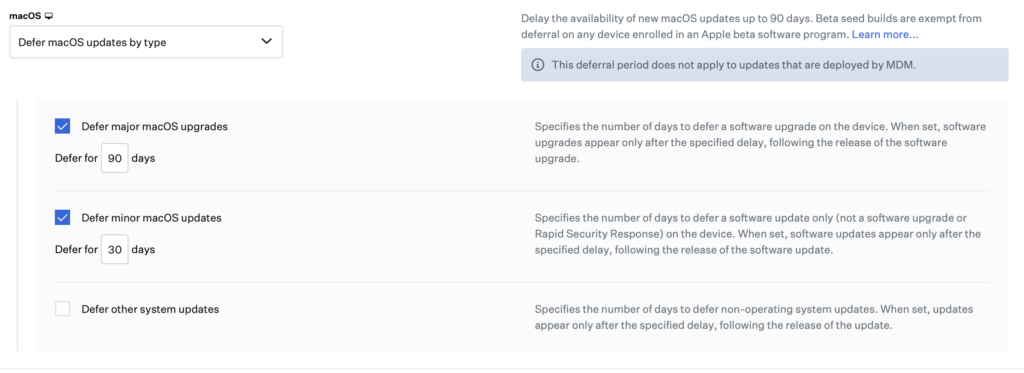
When you distribute the Defer Software Update command, users cannot see that there is a new OS update when they go into the Software Update section. But this also has an upper time limit. You can defer for at most 90 days. If you want to apply this restriction, today is exactly the right time. Actually, the 90-day period becomes valid from the moment you distribute the restriction to your users using this command. However, applying this restriction before the operating system is released ensures that users can never move to the macOS Tahoe or iOS/iPadOS 26 versions at all. If you apply it after users have moved to the macOS Tahoe version, you will have prevented them from receiving the major or minor updates that come afterward.
Timeline
1. Every year in June, Apple introduces the next operating systems at the WWDC conference. On this date, the first beta versions are made available to developers.
2. In July, the Public beta version is released. Anyone who wants can experience the new operating systems.
3. Various beta versions are released until September. In September, after the last beta, the RC (Release Candidate) version and immediately afterward the final version are released.
4. After the new iPhone models are introduced, the date on which the final version will be distributed is usually specified within a week. For this year, that date was September 15, 2025.
How to defer?
Although this feature varies according to the MDM solution you use, it can generally be found under the Restrictions section.
For Jamf Pro, it can be found under Computers > Configuration Profiles > Restrictions > Functionality.

For Kandji, it can be found under Library > Add Library Item > Software Update > Software Update Deferrals.
For Microsoft Intune, it can be found under Devices > macOS > Configuration > Declarative Device Management > Deferrals.

Photo by Julia Fiander on Unsplash
Leave a Reply