

OpenAI recently released a version of ChatGPT specifically designed for Intune. Available for iOS and iPadOS, this new app targets enterprise use and schools. You cannot sign into the ChatGPT for Intune app with a personally purchased ChatGPT account. Your organization must have a ChatGPT Enterprise agreement in place. Sign-in is available using accounts defined in Microsoft Entra ID and through the Microsoft Authenticator app.

But Why?
There is a single answer to this question: AI Governance. Organizations want to control how their employees (or schools their students) are using artificial intelligence tools. Otherwise, an unmonitored AI tool could expose corporate secrets — even accidentally — or leak information about products still under development.
One of the announcements at WWDC 2026 was that subscription purchases can now fall under VPP. Starting in September 2026, organizations that want their employees to work with ChatGPT will be able to purchase ChatGPT subscriptions centrally on behalf of the entire organization. However, they will not be able to control what users can do within that app.
In a managed environment, users can work with GPTs created specifically for the organization within ChatGPT, and administrators can manage users with different roles. You can find information about what you can do with ChatGPT Enterprise in this article.
Organizations that choose ChatGPT as their AI solution and use Microsoft Intune as their MDM solution should deploy the ChatGPT for Intune app to end users instead of the standard consumer version of ChatGPT.
How Is It Deployed?
You can purchase ChatGPT for Intune as a VPP app from Apple Business and deploy it through Intune. Or you can tell your users to download it themselves from the iOS App Store. OpenAI has prepared a guide on how to deploy the app. You can find it at this address.
As an Enterprise app, ChatGPT for Intune needs to be approved by an Entra admin user. After that, you can deploy it to user devices using your standard deployment methods.
The only thing to pay attention to here is that you should also define the app’s permissions through an App Protection Policy and push it to users along with the app itself.
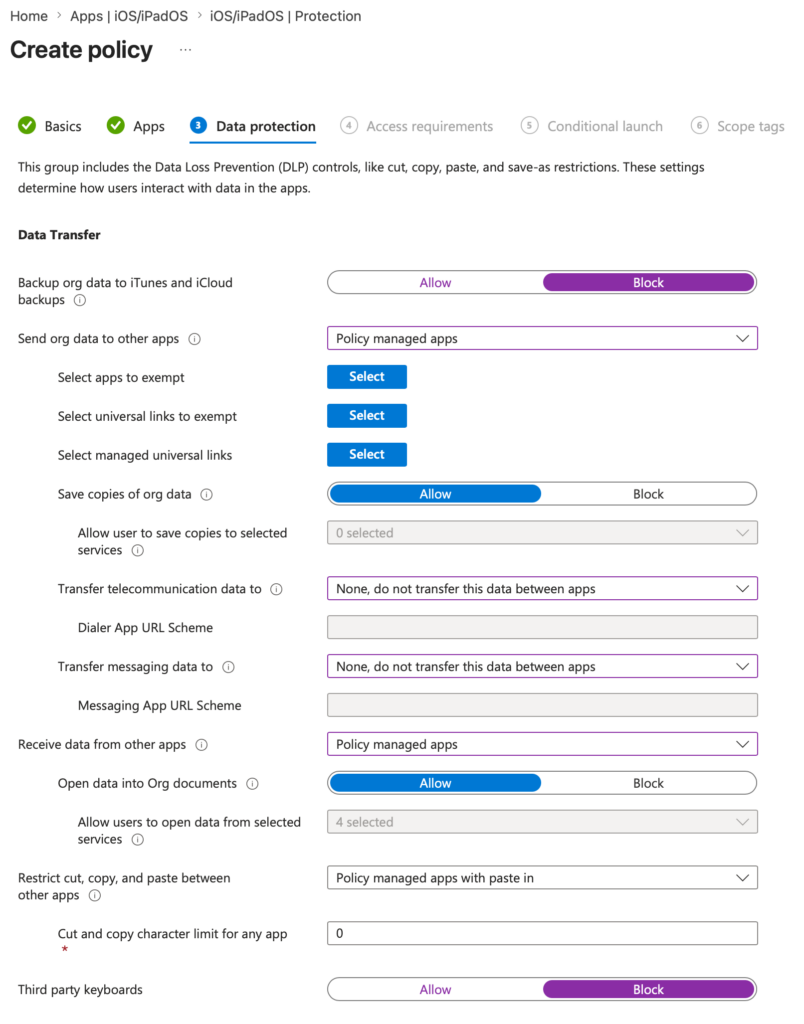
When setting up the App Protection Policy, the ChatGPT for Intune option will already appear in your search. But if for any reason it doesn’t, you can also define your policy using the Bundle ID com.openai.chat.intune.
Leave a Reply