

How do we get rid of the Shadow IT concept on Apple Devices
What Is Shadow IT?
Shadow IT, in its simplest definition, refers to the devices, applications, and services that employees use outside the knowledge, approval, or control of the organization’s IT department. This risk can simply arise even via an individual phone used outside the organization inventory.
For example, operations such as an employee:
- Using an application that hasn’t passed the IT department’s approval,
- Performing operations with personal accounts on a corporate device,
- Changing security policies according to their own preference,
- Acting with admin privileges on a corporate device
…are evaluated within the scope of Shadow IT.

Why Does Shadow IT Arise?
Employees most of the time do not create Shadow IT with the aim of harming the organization. On the contrary, the aim is usually to be able to do their work faster.
Quite everyday needs such as quickly sharing a file, sending a large-sized document, installing a needed application, or continuing to work via a different device can cause Shadow IT to arise.
For example, uploading a corporate file to a personal cloud account or sharing a corporate file via a person’s individual WhatsApp may be only a practical file-sharing method from the employee’s perspective.
However, all these situations, from the IT department’s perspective, raise many questions that need to be answered, such as:
- Where is this file currently stored?
- Who can access the file?
- When the employee leaves the organization, will their access to the file continue?
- Will we be able to remotely delete this data when needed?
…And the Shadow IT problem begins exactly here.
So How Does Apple Eliminate the Shadow IT Risk?
Apple offers many manageable/restrictable areas for corporate device management. But first, we need to briefly recall how Apple views the concept of corporate device management.
The First Step: Apple Business and MDM
There’s a lot of content on the blog related to Apple Business and MDM. One reason for this is that Apple shows the AB + MDM path as best practice. These two structures are not alternatives to each other; on the contrary, they are systems that work together and complement each other.
Apple Business allows the organization to organize the Apple devices, applications, and corporate Apple services it owns under a central structure.
An organization whose devices are registered in Apple Business has proven to Apple that ownership of the devices is with it, and has obtained the capability to manage the device in fully supervised mode.
The continuation of the process is distributing configurations, security policies, and applications to devices by choosing an MDM solution suitable for organizational needs.

If we examine it through the examples we gave at the beginning of the article, Apple’s answers to these questions are as follows:
Using an Application That Hasn’t Passed the IT Department’s Approval
Apple allows organizations to restrict downloading applications via the App Store and the browser. In addition, depending on the MDM solution used, it also allows applications like Company Portal (Intune) and Self Service (Jamf) to be customized like a corporate application pool. Through the applications organizations add into these portals, they restrict their personnel from downloading applications outside their own application pool.
Performing Operations with Personal Accounts on a Corporate Device
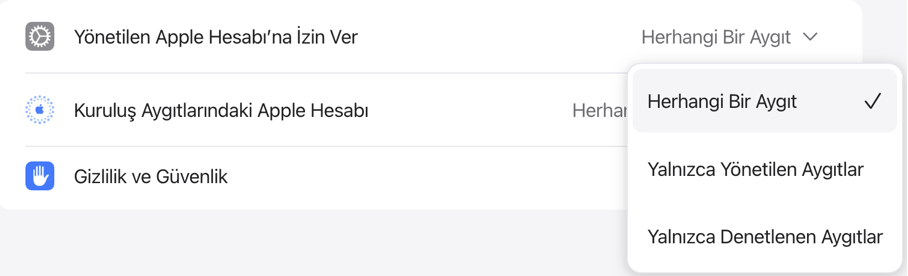
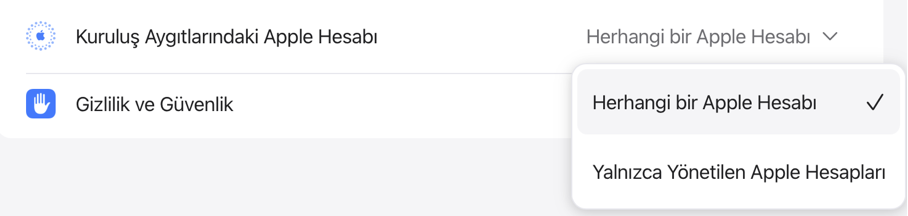
Apple allows managed corporate Apple accounts to be defined on devices in the organization inventory. With a quick selection made from the Apple Business portal, it allows corporate devices to be used only with managed Apple accounts, or vice versa, a managed Apple account to be used only on corporate devices.
Changing Security Policies According to Individual Preferences
Apple, compared to other operating systems, offers security tools built into the device. It gives these security solutions the name Platform Security and allows these areas to be managed.
Organizations can, via the MDM solution they use, configure and manage security features like FileVault, Gatekeeper, Firewall, and SIP so that the device receives them automatically at first setup.

Acting with Admin Privileges on a Corporate Device
Apple allows the user account that will be opened during the setup of the device to be opened with standard privileges, and also a “hidden” admin account (whose control is entirely with IT) that IT teams can perform operations with remotely when needed to be created.
These configurations are only answers given to the basic questions that come to mind at first glance. But the perspective Apple offers as a manageable-touchable area is much broader and more comprehensive.
And this actually brings us to a more fundamental question.
MEETING CORPORATE APPLE MANAGEMENT: PoC
You can reach detailed information on the subject from its content on the blog.
Leave a Reply