

Managing the Apple ecosystem at the corporate level is quite easy when only a few devices are involved. But when the number reaches the hundreds or thousands, manual operations can turn into an operational nightmare. This is exactly the point where the Apple Business Manager (ABM) API comes into play.
In the first part of the article, we’ll examine what ABM and the ABM API are, what they add to your business, and why they’re an inseparable part of modern IT infrastructures.
What Is Apple Business Manager (ABM)?
Apple Business Manager (ABM) is a corporate portal that Apple offers free of charge so that organizations can centrally manage Apple devices and their users. Fundamentally, it allows you to manage device management, user and account management, application and license distribution, and device ownership and security from a single portal.
What Is the Apple Business Manager API?
The Apple Business Manager API is a programming interface that builds a bridge between Apple’s corporate management platform and your own software or third-party MDM (Mobile Device Management) solutions.
To put it simply, it allows you to automate — by writing code — operations such as device assignments, server configurations, and application management that you do manually by logging into the ABM interface.
Why Should You Use the ABM API?
The biggest benefit of using the API is that it reduces IT teams’ daily operational load and eliminates the error risks that arise in manual management. The following headings show this difference clearly:
A. Operational Automation
With the manual process:
- You find devices one by one via ABM and assign them to MDM servers
- A wrong choice can create a forgotten assignment or the need for a repeat
- For hundreds/thousands of devices, this operation can take long periods.
With the API:
- You do the same operation within seconds with a few lines of code and a request trigger
- You can assign, withdraw, or redirect thousands of devices in bulk
- An implementation faithful to the “zero-touch deployment” approach is provided
Result: Time and operational savings.
B. Data Synchronization and Reporting
With the manual process:
- Serial numbers are tracked by being manually exported from ABM
- They need to be manually entered into ERP/asset management systems
- The possibility of error arises in the current inventory list (even if a device is deleted or moved, record discrepancies can occur)
With the API:
- The entire device list in ABM can be pulled instantly and synchronized to internal systems.
- Parameters such as serial number, ownership/assignment changes, etc. are reflected and reported in real time.
- The “reality vs. record” discrepancy in the inventory list is eliminated
Result: A dynamic, up-to-date, and error-free inventory tracking structure.
C. Reduction of the Margin of Error
With the manual process, errors such as the following can occur:
- Entering a wrong serial number
- Assigning to the wrong MDM server
- A device being overlooked
- Inconsistencies arising from redundant records
With the API:
- Data processing is done with the accuracy Apple provides
- Since serial numbers and device information are taken directly from Apple, input errors, copying errors, or missing data situations are eliminated
- Business rules can be automatically applied and assignments suitable for segmentation can be provided (e.g. “automatic distribution to brand-partnered MDM servers”)
Result: Consistency + accuracy + a sustainable process.
Core Capabilities of the ABM API
ABM API ile neler yapabileceğinizi bilmek, projelerinizin kapsamını belirlemenize yardımcı olur:
- Aygıt Yönetimi: Aygıtların hangi MDM sunucusuna atanacağını belirlemek veya değiştirmek.
- Sunucu Yönetimi: Birden fazla MDM sunucusunu tek bir merkezden yönetmek ve senkronize etmek.
- Aygıt Detaylarını Sorgulama: Bir aygıtın seri numarası ile geçmişini, özelliklerini ve hangi sunucuya bağlı olduğunu görmek.
Who Is It Suitable For?
Using the ABM API generally becomes inevitable in the following scenarios:
- Large-Scale Enterprises: Organizations that have hundreds or thousands of Apple devices and want to track them from a central system.
- Software Developers & MSPs: Technology firms that develop their own inventory management software or offer custom MDM solutions to their customers.
- IT Consultants: Individuals or organizations that want to optimize their customers’ Apple deployment processes.
Notes Before Technical Preparation
Before moving on to the technical implementation we’ll do via Postman in the continuation of the article, make sure you have the following:
- An approved Apple Business Manager account.
- Administrator or Device Manager privileges on the account.
- The necessary certificates and keys to be created via the Apple Developer portal.
Step-by-Step ABM API Integration
Sending Our First Request Using Postman and Python
In this part of the article, we’ll roll up our sleeves and start talking to Apple’s servers, and we’ll cover how to establish the first successful connection with its technical details. At the end of this guide, you’ll have a working Postman Collection in your hands. For ABM API usage, the following steps are followed in order:
ABM API (.pem) is created
↓
JWT (client assertion) is created
↓
Sent to the Token Endpoint (Authentication)
↓
Access Token (Bearer Token) is obtained
↓
A Request is made to the API (Authorization type: Bearer)
↓
A Response is received from the API
Step-by-Step Operations
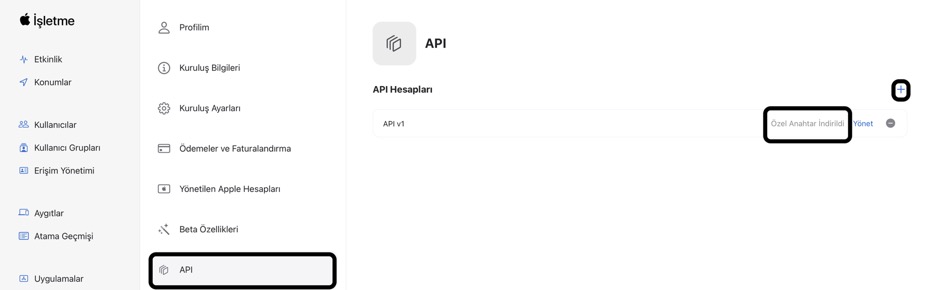
1. An API is created within ABM.
• Download and store the private key (.pem). The .pem generated for each API can only be downloaded once; store it securely.
• Log in to Apple Business Manager.
• Click on your own name located in the left corner and select Preferences.
• Click on the API tab, click the “+” button located in the top right, and give your API a name.
2. The JWT (client assertion) is created via the IDE used (e.g. Python editor).
The private_key_file, client_id, team_id, key_id, audience, and alg fields within the code block to be created must be defined correctly. private_key_file is the downloaded .pem file. The client_id, team_id, and key_id information is available in the API interface created in ABM.
Note: (team_id should be used as client_id.) To learn the information, the Manage option located next to the created API should be used.
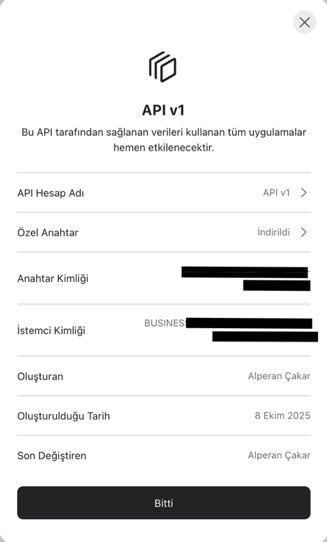

As a result of running the code, a client_assertion.txt file is created in the relevant folder.
NOTE: Python libraries need to be used for the JWT generation to be provided via Python. The information regarding the libraries to be used is as follows. For non-built-in modules, downloading is required before the operation.
| Line | Module | Included? | Reason |
| import os | OS | Yes | to read the key file |
| İmport datetime as dt | datetime | Yes | token validity period |
| İmport uuid as uuid | uuid | Yes | unique identity generation |
| from authlib.jose import jwt | Authlib | No | to create the client assertion for verification |
| from Crypto.PublicKey import ECC | PyCryptodome | No | to load the private key in the .pem file and sign the JWT |
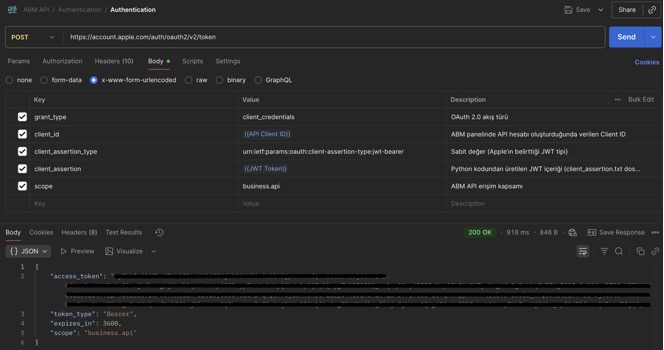
3. Providing the Postman Authentication process
With the token in the client_assertion.txt file, a POST request is made to the address https://account.apple.com/auth/oauth2/v2/token. As a result of the provided request, an access (bearer) token is obtained as a response.
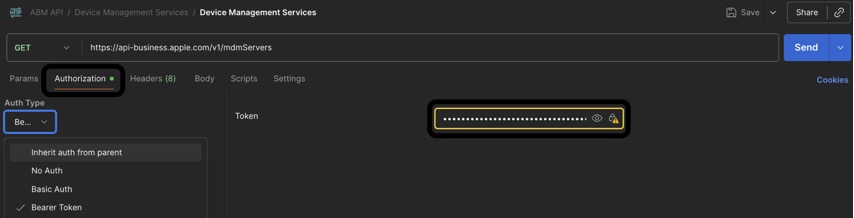
4. Using the API Requests
API requests are provided with the access token. Before using any method, the Auth Type in the Authorization area of the relevant request structure must be selected as Bearer Token. And the access token obtained from the Authentication process must be entered into the token field.
Usable Request Types
GET Organization Devices – A list of devices enrolled using Automated Device Enrollment (ADE) in an organization is obtained.
GET Device Information – Information about a device in an organization is obtained via serial number.
GET Device Management Services – A list of the MDM servers in an organization is obtained.
GET Device Serial Numbers for a Device Management Service – A list of the device serial numbers assigned to a device management service (MDM server) is obtained.
GET Assigned Device Management Service ID for a Device – The identity information of the MDM server a device is assigned to is obtained.
GET Assigned Device Management Service Information for a Device – The service information of the MDM server a device is assigned to is obtained.
POST Assign or Unassign Devices to a Device Management Service – Enables the assignment of devices to an MDM server or the removal of the existing assignment.
GET Organization Device Activity Information – Information about a device management action such as assignment or unassignment is obtained.
Things to Watch Out for in the Operation Flow
- The access (bearer) token is valid for approximately 1 hour; when it expires, a new token must be obtained.
- The client assertion token (JWT) is generated to be valid for a maximum of 180 days; it can be re-signed before it expires.
- While the operation is being carried out, the
.pyand.pemfiles must be in the same folder. - The expiration period of the
.pemtoken belonging to the API created within ABM is 1 year. After 1 year, a new.pemtoken can be obtained via the generate option again.
Common Errors and Checks
invalid_client → Mostly the following reasons:
audis wrong (it must absolutely be https://account.apple.com/auth/oauth2/v2/token),- Performing operations with an expired JWT, access (bearer), or
.pemtoken, - Signing with a wrong/incorrect key ID or private key,
- Wrong scope definition (for ABM it must be
business.api).
Resources
https://developer.apple.com/documentation/applebusinessmanagerapi
https://support.apple.com/tr-tr/guide/apple-business-manager/axm33189f66a/web
ABM API.postman_collection.json
Client Assertion.py
Photo by Rubaitul Azad on Unsplash
Leave a Reply